OpenStack Antelope : OpenStack Rally2023/04/20 |
|
Install OpenStack BenchiMarking Tool, Rally.
This example is based on the environment like follows.
------------+--------------------------+--------------------------+------------
            |                          |                          |
        eth0|10.0.0.30             eth0|10.0.0.50             eth0|10.0.0.51
+-----------+-----------+  +-----------+-----------+  +-----------+-----------+
|   [ dlp.srv.world ]   |  | [ network.srv.world ] |  |  [ node01.srv.world ] |
|     (Control Node)    |  |     (Network Node)    |  |     (Compute Node)    |
|                       |  |                       |  |                       |
|  MariaDB    RabbitMQ  |  |      Open vSwitch     |  |        Libvirt        |
|  Memcached  Nginx     |  |     Neutron Server    |  |      Nova Compute     |
|  Keystone   httpd     |  |      OVN-Northd       |  |      Open vSwitch     |
|  Glance     Nova API  |  |  Nginx  iSCSI Target  |  |   OVN Metadata Agent  |
|  Cinder API           |  |     Cinder Volume     |  |     OVN-Controller    |
|  Rally                |  |    Heat API/Engine    |  |                       |
+-----------------------+  +-----------------------+  +-----------------------+
|
| [1] | Create user and Database for Rally in MariaDB. |
|
[root@dlp ~(keystone)]# mysql Welcome to the MariaDB monitor. Commands end with ; or \g. Your MariaDB connection id is 90188 Server version: 10.5.16-MariaDB MariaDB Server Copyright (c) 2000, 2018, Oracle, MariaDB Corporation Ab and others. Type 'help;' or '\h' for help. Type '\c' to clear the current input statement. MariaDB [(none)]> create database rally; Query OK, 1 row affected (0.00 sec) MariaDB [(none)]> grant all privileges on rally.* to rally@'localhost' identified by 'password'; Query OK, 0 rows affected (0.00 sec) MariaDB [(none)]> grant all privileges on rally.* to rally@'%' identified by 'password'; Query OK, 0 rows affected (0.00 sec) MariaDB [(none)]> flush privileges; Query OK, 0 rows affected (0.00 sec) MariaDB [(none)]> exit Bye |
| [2] | Rally. |
|
[root@dlp ~(keystone)]# dnf --enablerepo=centos-openstack-antelope,epel,crb -y install openstack-rally openstack-rally-plugins python3-fixtures
|
| [3] | Configure Rally. |
|
[root@dlp ~(keystone)]#
vi /etc/rally/rally.conf # line 33 : add the log file name log_file = rally.log
# line 38 : add the log directory name log_dir = /var/log/rally
# line 203 : add the MariaDB connection info
connection = mysql+pymysql://rally:password@dlp.srv.world/rally
mkdir /var/log/rally [root@dlp ~(keystone)]# rally db create Creating database: mysql+pymysql://rally:password@dlp.srv.world/rally Database created successfully |
| [4] | Add environment variables for Openstack to Rally to run Rally BenchiMarking Tasks. |
|
[root@dlp ~(keystone)]# rally deployment create --fromenv --name=my-cloud
+--------------------------------------+---------------------+----------+------------------+--------+
| uuid                                 | created_at          | name     | status           | active |
+--------------------------------------+---------------------+----------+------------------+--------+
| 4c5f5fe3-d362-4f4a-b009-777141c17094 | 2023-04-20T03:40:49 | my-cloud | deploy->finished |        |
+--------------------------------------+---------------------+----------+------------------+--------+
Using deployment: 4c5f5fe3-d362-4f4a-b009-777141c17094
~/.rally/openrc was updated

HINTS:

* To use standard OpenStack clients, set up your env by running:
        source ~/.rally/openrc
  OpenStack clients are now configured, e.g run:
        openstack image list
[root@dlp ~(keystone)]# source ~/.rally/openrc [root@dlp ~(keystone)]# rally deployment show my-cloud +----------------------------+----------+----------+-------------+-------------+---------------+ | auth_url | username | password | tenant_name | region_name | endpoint_type | +----------------------------+----------+----------+-------------+-------------+---------------+ | https://dlp.srv.world:5000 | admin | *** | admin | | None | +----------------------------+----------+----------+-------------+-------------+---------------+[root@dlp ~(keystone)]# rally deployment check -------------------------------------------------------------------------------- Platform openstack: -------------------------------------------------------------------------------- Available services: +-------------+----------------+-----------+ | Service | Service Type | Status | +-------------+----------------+-----------+ | __unknown__ | placement | Available | | __unknown__ | rating | Available | | barbican | key-manager | Available | | ceilometer | metering | Available | | cinder | volumev3 | Available | | cloud | cloudformation | Available | | glance | image | Available | | gnocchi | metric | Available | | heat | orchestration | Available | | keystone | identity | Available | | neutron | network | Available | | nova | compute | Available | +-------------+----------------+-----------+ |
| [5] | How to use Rally. For a sample scenario in following tutorial, there are many other samples on the site below, refer to them. ⇒ https://github.com/openstack/rally/blob/master/samples/tasks/scenarios/ |
|
# set Benchimarking scenario # for example, set a simple scenario to create and delete a compute instance # for [flavor], specify your own registered flavor name # for [image], specify your own registered image name
[root@dlp ~(keystone)]#
vi boot-and-delete.json
{
  "NovaServers.boot_and_delete_server": [
    {
      "args": {
        "flavor": {
          "name": "m1.small"
        },
        "image": {
          "name": "CentOS-Stream9"
        },
        "force_delete": false
      },
      "runner": {
        "type": "constant",
        "times": 10,
        "concurrency": 2
      },
      "context": {}
    }
  ]
}
# start BenchiMarking Tasks [root@dlp ~(keystone)]# rally task start boot-and-delete.json
--------------------------------------------------------------------------------
Preparing input task
--------------------------------------------------------------------------------

Task is:
{
  "NovaServers.boot_and_delete_server": [
    {
      "args": {
        "flavor": {
          "name": "m1.small"
        },
        "image": {
          "name": "CentOS-Stream9"
        },
        "force_delete": false
      },
      "runner": {
        "type": "constant",
        "times": 10,
        "concurrency": 2
      },
      "context": {}
    }
  ]
}

Task syntax is correct :)
Running Rally version 3.3.0
--------------------------------------------------------------------------------
Task  7ff3764e-d442-4091-94c0-f28eeb24701f: started
--------------------------------------------------------------------------------

.....
.....

--------------------------------------------------------------------------------
Task 7ff3764e-d442-4091-94c0-f28eeb24701f has 0 error(s)
--------------------------------------------------------------------------------

+-----------------------------------------------------------------------------------------------------------------------+
|                                                 Response Times (sec)                                                  |
+--------------------+-----------+--------------+--------------+--------------+-----------+-----------+---------+-------+
| Action             | Min (sec) | Median (sec) | 90%ile (sec) | 95%ile (sec) | Max (sec) | Avg (sec) | Success | Count |
+--------------------+-----------+--------------+--------------+--------------+-----------+-----------+---------+-------+
| nova.boot_server   | 1.644     | 3.837        | 4.283        | 4.314        | 4.346     | 3.535     | 100.0%  | 10    |
| nova.delete_server | 2.097     | 2.119        | 2.145        | 2.152        | 2.16      | 2.121     | 100.0%  | 10    |
| total              | 3.742     | 5.958        | 6.409        | 6.457        | 6.506     | 5.657     | 100.0%  | 10    |
|  -> duration       | 2.742     | 4.958        | 5.409        | 5.457        | 5.506     | 4.657     | 100.0%  | 10    |
|  -> idle_duration  | 1.0       | 1.0          | 1.0          | 1.0          | 1.0       | 1.0       | 100.0%  | 10    |
+--------------------+-----------+--------------+--------------+--------------+-----------+-----------+---------+-------+

Load duration: 27.6548
Full duration: 36.4713

HINTS:
* To plot HTML graphics with this data, run:
        rally task report 7ff3764e-d442-4091-94c0-f28eeb24701f --out output.html

* To generate a JUnit report, run:
        rally task export 7ff3764e-d442-4091-94c0-f28eeb24701f --type junit-xml --to output.xml

* To get raw JSON output of task results, run:
        rally task report 7ff3764e-d442-4091-94c0-f28eeb24701f --json --out output.json
|
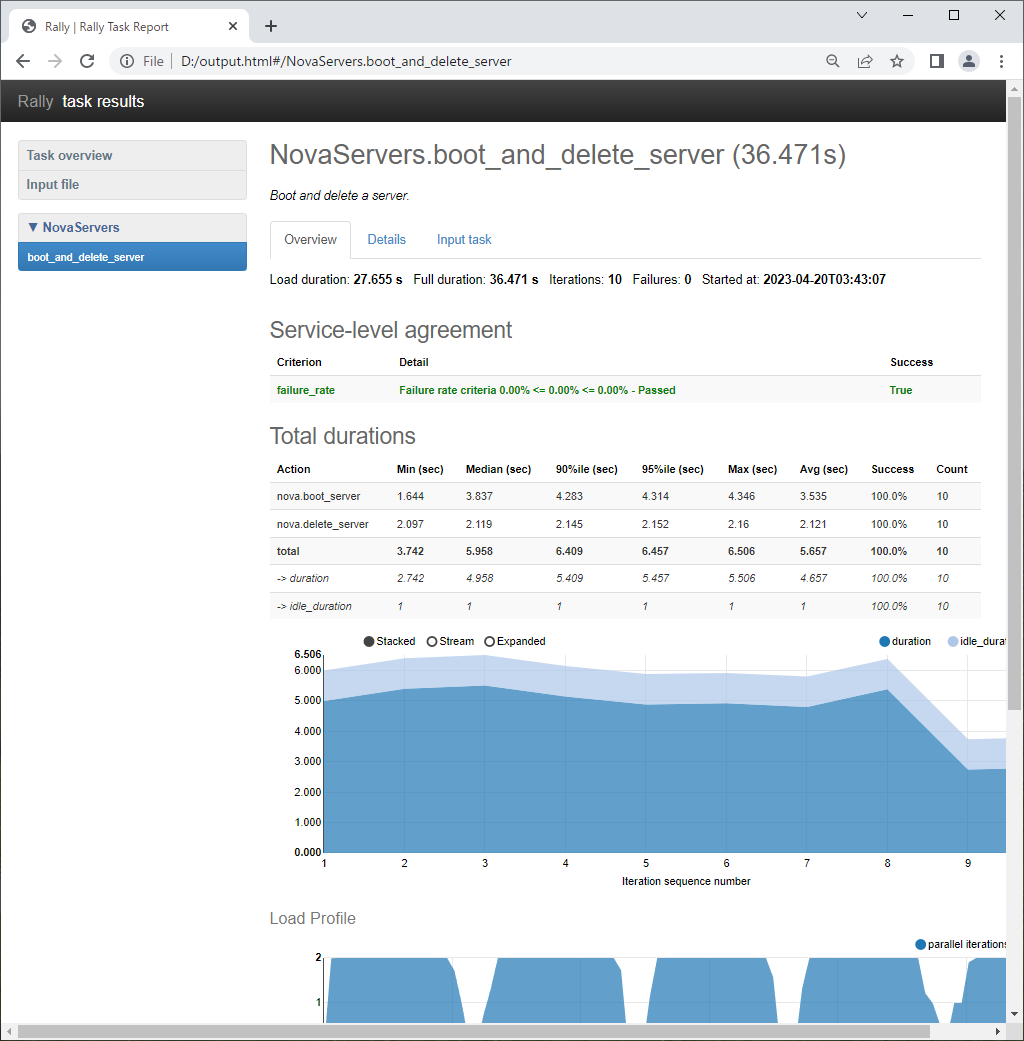
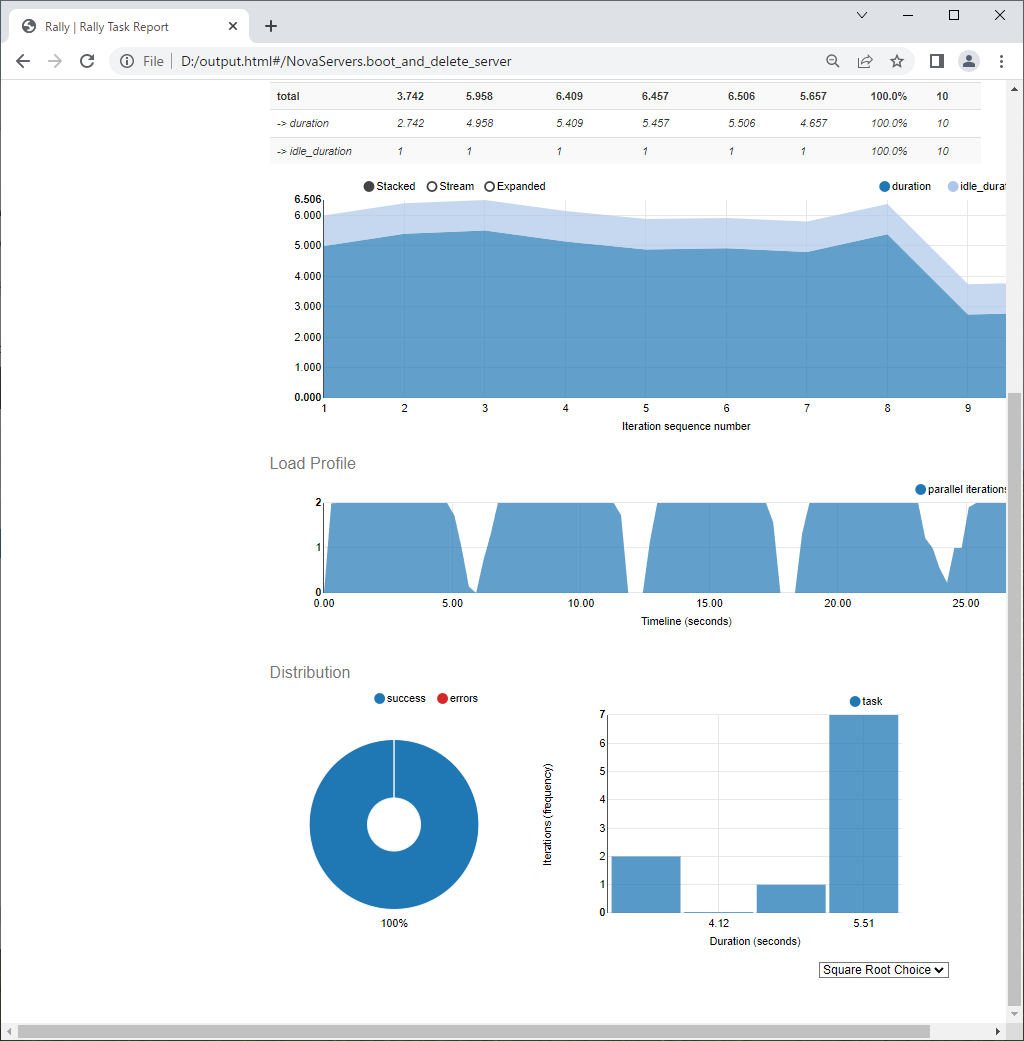
| [6] | To run the commands that were shown when task had completed, it's possible to generate HTML file with Graph like follows. |
|
|
Matched Content