Nagios 4 : Add Target Host (Services)2021/06/03 |
|
It's possible to monitor other Hosts on the network not only with simply Ping command but services on them.
|
|
| [1] | Install [nrpe] on a target host you'd like to monitor services on it. |
|
# install from EPEL
[root@node01 ~]#
dnf --enablerepo=epel -y install nrpe nagios-plugins-{ping,disk,users,procs,load,swap,ssh}
[root@node01 ~]#
vi /etc/nagios/nrpe.cfg # line 106 : add access permission (specify Nagios server) allowed_hosts=127.0.0.1,::1 ,10.0.0.30
# line 122 : permit arguments of commands on here dont_blame_nrpe= 1
# line 300 : comment out all # command[check_users]=/usr/lib64/nagios/plugins/check_users -w 5 -c 10# command[check_load]=/usr/lib64/nagios/plugins/check_load -r -w .15,.10,.05 -c .30,.25,.20# command[check_hda1]=/usr/lib64/nagios/plugins/check_disk -w 20% -c 10% -p /dev/hda1# command[check_zombie_procs]=/usr/lib64/nagios/plugins/check_procs -w 5 -c 10 -sZ# command[check_total_procs]=/usr/lib64/nagios/plugins/check_procs -w 150 -c 200
# line 305 : add follows command[check_users]=/usr/lib64/nagios/plugins/check_users -w $ARG1$ -c $ARG2$ command[check_load]=/usr/lib64/nagios/plugins/check_load -w $ARG1$ -c $ARG2$ command[check_disk]=/usr/lib64/nagios/plugins/check_disk -w $ARG1$ -c $ARG2$ -p $ARG3$ command[check_procs]=/usr/lib64/nagios/plugins/check_procs -w $ARG1$ -c $ARG2$ -s $ARG3$ systemctl enable --now nrpe |
| [2] | If Firewalld is running, allow nrpe port. |
|
[root@node01 ~]# firewall-cmd --add-port=5666/tcp --permanent success [root@node01 ~]# firewall-cmd --reload success |
| [3] | Configure Nagios server. |
|
[root@dlp ~]#
dnf --enablerepo=epel -y install nagios-plugins-nrpe
[root@dlp ~]#
vi /etc/nagios/nagios.cfg # line 51 : uncomment cfg_dir=/etc/nagios/servers mkdir /etc/nagios/servers [root@dlp ~]# chgrp nagios /etc/nagios/servers [root@dlp ~]# chmod 750 /etc/nagios/servers
[root@dlp ~]#
vi /etc/nagios/objects/commands.cfg # add to the end
define command {
    command_name    check_nrpe
    command_line    $USER1$/check_nrpe -H $HOSTADDRESS$ -c $ARG1$
}
[root@dlp ~]#
vi /etc/nagios/servers/node01.cfg # create new
define host {
    use                    linux-server
    host_name              node01
    alias                  node01
    address                10.0.0.51
}

# for ping
define service {
    use                    generic-service
    host_name              node01
    service_description    PING
    check_command          check_ping!100.0,20%!500.0,60%
}

# for free disk
define service {
    use                    generic-service
    host_name              node01
    service_description    Root Partition
    check_command          check_nrpe!check_disk\!20%\!10%\!/
}

# for current users
define service {
    use                    generic-service
    host_name              node01
    service_description    Current Users
    check_command          check_nrpe!check_users\!20\!50
}

# for total processes
define service {
    use                    generic-service
    host_name              node01
    service_description    Total Processes
    check_command          check_nrpe!check_procs\!250\!400\!RSZDT
}

# for current load
define service {
    use                    generic-service
    host_name              node01
    service_description    Current Load
    check_command          check_nrpe!check_load\!5.0,4.0,3.0\!10.0,6.0,4.0
}
systemctl restart nagios |
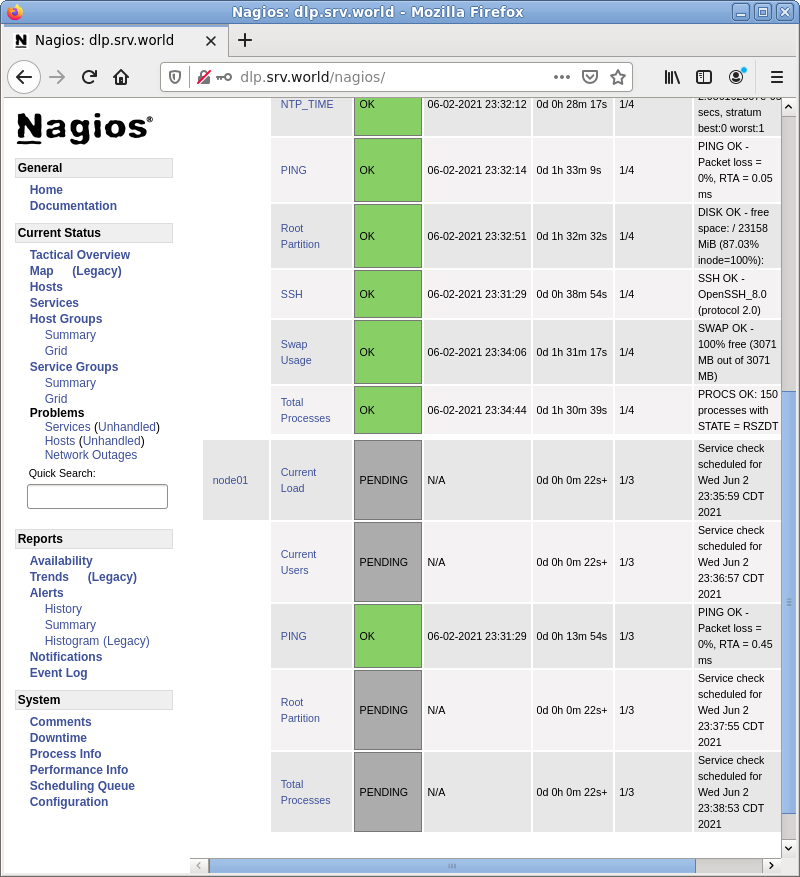
| [4] | It's possible to see the status for a new server on the admin site. |
|
Matched Content