SELinux : ブール値を変更する2025/10/22 |
|
デフォルト設定の [targeted] ポリシーなどのあらかじめ提供されているポリシーでは、一般的によく利用されるアプリケーションが一般的に使用する資源に対して、SELinux によるアクセス制御の設定を容易に切り替え可能なようにブール値が用意されています。 以下では [targeted] ポリシー適用下の環境で例示しています。 |
|
| [1] | ブール値の一覧は以下のようにして確認可能です。 |
|
# ブール値の一覧と現在の ON/OFF 状況を表示 dlp:~ # getsebool -a abrt_anon_write --> off abrt_handle_event --> on abrt_upload_watch_anon_write --> on antivirus_can_scan_system --> off antivirus_use_jit --> off auditadm_exec_content --> on authlogin_nsswitch_use_ldap --> off authlogin_radius --> off authlogin_yubikey --> off awstats_purge_apache_log_files --> off boinc_execmem --> on cdrecord_read_content --> off cluster_can_network_connect --> off cluster_manage_all_files --> off cluster_service_transition_to_unconfined_user --> off ..... ..... # ブール値の一覧を概要付きで表示 dlp:~ # semanage boolean -l SELinux boolean State Default Description abrt_anon_write (off , off) Allow abrt to anon write abrt_handle_event (on , on) Allow abrt to handle event abrt_upload_watch_anon_write (on , on) Allow abrt to upload watch anon write antivirus_can_scan_system (off , off) Allow antivirus to can scan system antivirus_use_jit (off , off) Allow antivirus to use jit auditadm_exec_content (on , on) Allow auditadm to exec content authlogin_nsswitch_use_ldap (off , off) Allow authlogin to nsswitch use ldap authlogin_radius (off , off) Allow authlogin to radius authlogin_yubikey (off , off) Allow authlogin to yubikey awstats_purge_apache_log_files (off , off) Allow awstats to purge apache log files boinc_execmem (on , on) Allow boinc to execmem cdrecord_read_content (off , off) Allow cdrecord to read content cluster_can_network_connect (off , off) Allow cluster to can network connect ..... ..... |
| [2] |
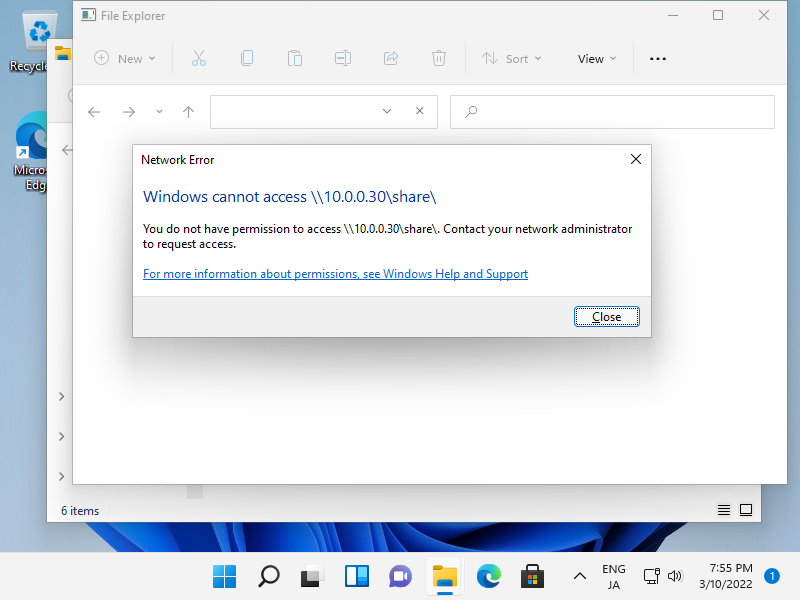
例として [samba_enable_home_dirs] というブール値について設定します。 [samba_enable_home_dirs] はデフォルトでは [off] となっており、SELinux によるアクセス制御を受ける設定となっています。 この状態で、例えば Samba の共有で [/home/share] に対して [777] のフルアクセス権を設定したとしても、SELinux によりアクセスは拒否されます。 これは [samba_enable_home_dirs] が [off] の状態では、Samba が [/home] 配下にアクセスするために必要な SELinux コンテキストが割り当てられないためです。 |
|
# デフォルトはオフの設定 dlp:~ # semanage boolean -l | grep samba_enable_home_dirs samba_enable_home_dirs (off , off) Allow samba to enable home dirs |
| 以下のように、設定した共有フォルダへアクセスしても、DAC で読み取り権が付与されているファイルは見えず、上位ディレクトリ [/home/share] に [777] を設定していてもアクセスは拒否されます。 |
|
| [3] | この状態からブール値 [samba_enable_home_dirs] を [on] に変更し、正常にアクセスできるようにするには、以下のように設定します。 |
|
# [samba_enable_home_dirs] をオンにする dlp:~ # setsebool -P samba_enable_home_dirs on dlp:~ # getsebool samba_enable_home_dirs samba_enable_home_dirs --> on # 変更された
# [samba_enable_home_dirs] で設定されるデフォルトの SELinux コンテキストにリストア dlp:~ # restorecon -R /home/share
|
|
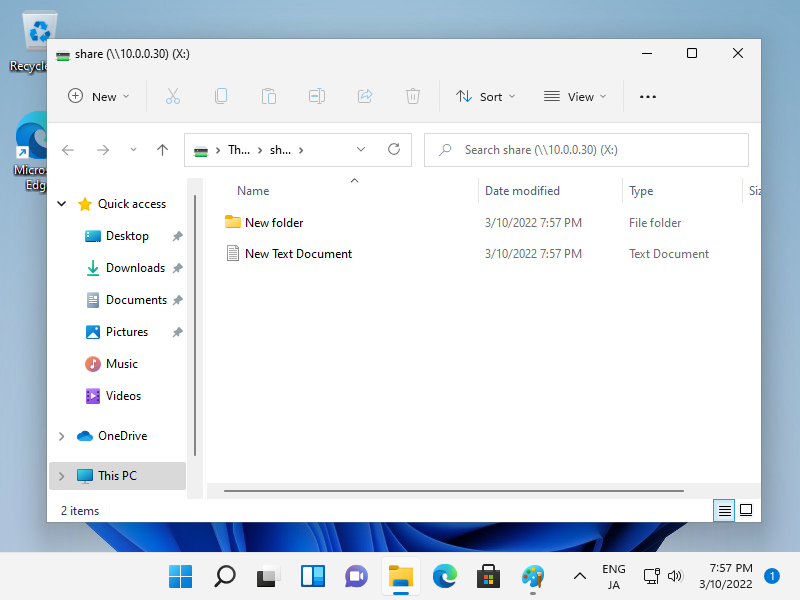
以上で、SELinux によるアクセス制限が許可され、以下のように通常の DAC アクセス権に沿ったアクセスが可能となります。 なお、ブール値 [samba_enable_home_dirs] を [on] に変更した後に対象ディレクトリ配下で作成したファイル/ディレクトリには、自動で 必要な SELinux コンテキストが割り当てられるため、毎回 [restorecon] を実行する必要はありません。 |
|
関連コンテンツ