Nagios : 監視対象項目を追加する2026/06/10 |
|
デフォルトの監視対象項目以外にも、様々な項目を監視対象として追加できます。 |
|
| [1] | プラグインは多数提供されています。 |
|
root@dlp:~# ll /usr/lib/nagios/plugins total 1904 drwxr-xr-x 2 root root 4096 Jun 10 00:47 ./ drwxr-xr-x 3 root root 4096 Apr 20 18:07 ../ -rwxr-xr-x 1 root root 35704 Jan 26 19:25 check_apt* -rwxr-xr-x 1 root root 2337 Jan 26 19:25 check_breeze* -rwxr-xr-x 1 root root 36088 Jan 26 19:25 check_by_ssh* lrwxrwxrwx 1 root root 9 Jan 26 19:25 check_clamd@ -> check_tcp -rwxr-xr-x 1 root root 31416 Jan 26 19:25 check_cluster* -rwxr-xr-x 1 root root 90104 Jan 26 19:25 check_curl* -rwxr-xr-x 1 root root 31608 Jan 26 19:25 check_dbi* -rwxr-xr-x+1 root root 35576 Jan 26 19:25 check_dhcp* ..... ..... # 下記パッケージをインストールすることで追加プラグインも利用可 root@dlp:~# apt search monitoring-plugins-contrib monitoring-plugins-contrib/stable 48.20250420 amd64 Plugins for nagios compatible monitoring systems |
| [2] | 例として、NTP サーバーとの時間のずれを監視項目として追加します。 |
|
# [check_ntp_time] プラグインの使用方法 root@dlp:~# /usr/lib/nagios/plugins/check_ntp_time -h
.....
.....

 -w, --warning=THRESHOLD
    Offset to result in warning status (seconds)
 -c, --critical=THRESHOLD
    Offset to result in critical status (seconds)

.....
.....
root@dlp:~#
vi /etc/nagios4/objects/commands.cfg
# 最終行にコマンド定義を追記
define command{
    command_name    check_ntp_time
    command_line    $USER1$/check_ntp_time -H $ARG1$ -w $ARG2$ -c $ARG3$
}
root@dlp:~#
vi /etc/nagios4/objects/localhost.cfg
# 最終行に追記
# NTP サーバー [10.0.0.10] との時間が 1秒差で Warning, 2秒差で Critical
define service{
    use                             generic-service
    host_name                       localhost
    service_description             NTP_TIME
    check_command                   check_ntp_time!10.0.0.10!1!2
}
systemctl reload nagios4 |
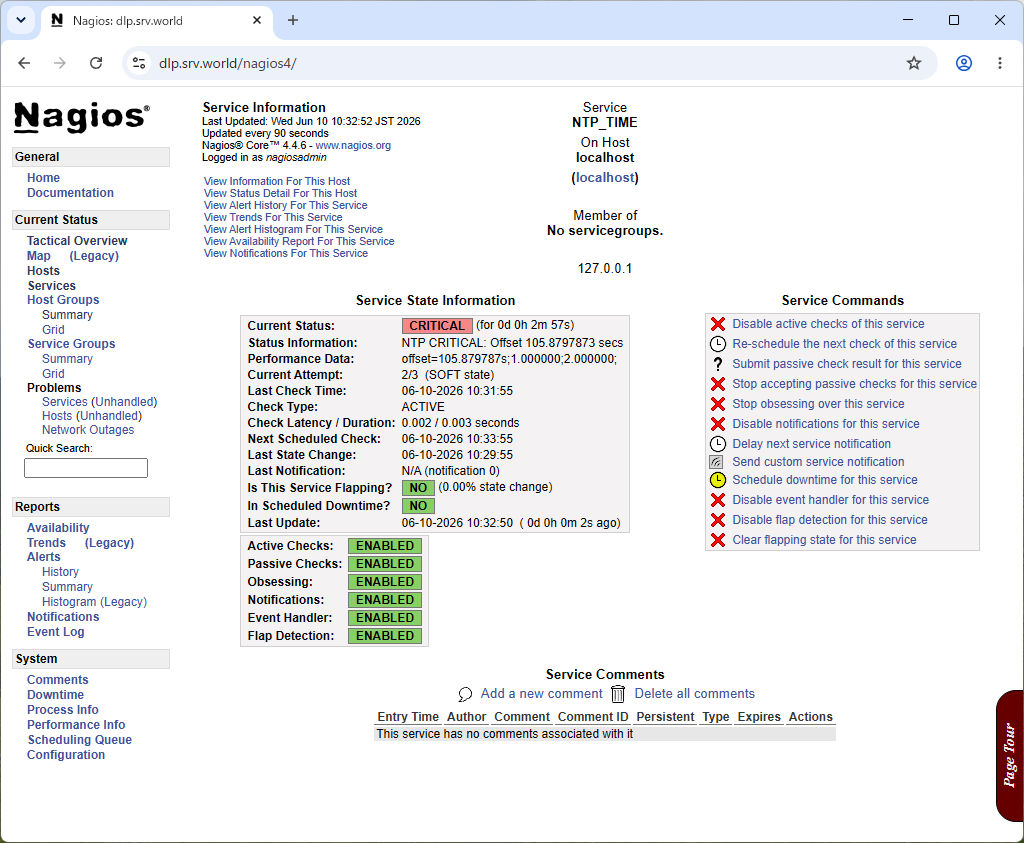
| [3] | 追加設定した監視項目は Nagios 管理サイトにログインすると確認できます。 |
|
関連コンテンツ