OpenShift Origin (OKD) 3.10 : Docker Registry の設定2018/08/21 |
|
Docker Registry の設定です。
OpenShift Origin インストールの通り構成すると、デフォルトで Registry 用の Pod も設定され稼働していますが、コンテナーイメージ用のストレージ領域は一時的なもののため、変更したい場合は以下のようにして Registry 用の Pod を再作成します。
なお、ストレージには OpenStack Swift や Google Storage, Microsoft Azure 等が利用可能ですが、当例では
デフォルトの Filesystem を例にします。
当例では以下のような環境を例に OpenShift クラスターを構成しています。
-----------+-----------------------------+-----------------------------+------------
           |10.0.0.25                    |10.0.0.51                    |10.0.0.52
+----------+-----------+      +----------+-----------+      +----------+-----------+
|  [ ctrl.srv.world ]  |      | [ node01.srv.world ] |      | [ node02.srv.world ] |
|     (Master Node)    |      |    (Compute Node)    |      |    (Compute Node)    |
|     (Infra Node)     |      |                      |      |                      |
|     (Compute Node)   |      |                      |      |                      |
+----------------------+      +----------------------+      +----------------------+
|
| [1] | インストーラーが構成したデフォルトの Registry は削除しておきます。 |
|
[origin@ctrl ~]$ oc get pods NAME READY STATUS RESTARTS AGE docker-registry-1-4rkv8 1/1 Running 1 2h registry-console-1-62j9p 1/1 Running 1 2h router-1-97bzn 1/1 Running 1 2h[origin@ctrl ~]$ oc describe pod docker-registry-1-4rkv8 | grep -A3 'Volumes:'
Volumes:
  registry-storage:
    Type:    EmptyDir (a temporary directory that shares a pod's lifetime)
    Medium:
# 関連設定削除 [origin@ctrl ~]$ oc delete all -l docker-registry=default pod "docker-registry-1-4rkv8" deleted replicationcontroller "docker-registry-1" deleted service "docker-registry" deleted deploymentconfig.apps.openshift.io "docker-registry" deleted[origin@ctrl ~]$ oc delete all -l app=registry-console pod "registry-console-1-62j9p" deleted replicationcontroller "registry-console-1" deleted service "registry-console" deleted deploymentconfig.apps.openshift.io "registry-console" deleted
[origin@ctrl ~]$
oc delete serviceaccount registry serviceaccount "registry" deleted
[origin@ctrl ~]$
oc delete oauthclients cockpit-oauth-client oauthclient "cockpit-oauth-client" deleted # もし存在する場合は削除 [origin@ctrl ~]$ oc delete clusterrolebindings registry-registry-role clusterrolebinding.authorization.openshift.io "registry-registry-role" deleted oc get pods NAME READY STATUS RESTARTS AGE router-1-97bzn 1/1 Running 1 5h |
| [2] | Registry の設定です。 例として [compute] ロールに属する [node01.srv.world] ノード上にコンテナーイメージ保管用ディレクトリーを作成し、当該ノード上に Registry Pod を固定して作成する設定をします。 |
|
[origin@ctrl ~]$ oc get nodes NAME STATUS ROLES AGE VERSION ctrl.srv.world Ready infra,master 5h v1.10.0+b81c8f8 node01.srv.world Ready compute 5h v1.10.0+b81c8f8 node02.srv.world Ready compute 5h v1.10.0+b81c8f8 # イメージ保管用ディレクトリー作成 (任意の場所でOK) [origin@ctrl ~]$ [origin@ctrl ~]$ # registry アカウントに権限を付与 [origin@ctrl ~]$ oc adm policy add-scc-to-user privileged system:serviceaccount:default:registry scc "privileged" added to: ["system:serviceaccount:default:registry"] # Registry 設定 [origin@ctrl ~]$ sudo oc adm registry \ --config=/etc/origin/master/admin.kubeconfig \ --service-account=registry \ --mount-host=/var/lib/origin/registry \ --selector='kubernetes.io/hostname=node01.srv.world' \ --replicas=1
--> Creating registry registry ...
    serviceaccount "registry" created
    clusterrolebinding "registry-registry-role" created
    deploymentconfig "docker-registry" created
    service "docker-registry" created
--> Success
# しばらくするとデプロイが完了し Pod が稼働状態になる [origin@ctrl ~]$ oc get pods NAME READY STATUS RESTARTS AGE docker-registry-1-zbr52 1/1 Running 0 24s router-1-97bzn 1/1 Running 1 5h[origin@ctrl ~]$ oc describe pod docker-registry-1-zbr52
Name:           docker-registry-1-zbr52
Namespace:      default
Node:           node01.srv.world/10.0.0.51
Start Time:     Tue, 21 Aug 2018 19:08:40 +0900
Labels:         deployment=docker-registry-1
                deploymentconfig=docker-registry
                docker-registry=default
Annotations:    openshift.io/deployment-config.latest-version=1
                openshift.io/deployment-config.name=docker-registry
                openshift.io/deployment.name=docker-registry-1
                openshift.io/scc=privileged
Status:         Running
IP:             10.129.0.4
Controlled By:  ReplicationController/docker-registry-1
Containers:
  registry:
    Container ID:   docker://b2799a5ada8f871f9442599170f1c56c01f35862c2fb2e775a258bad375e9627
    Image:          openshift/origin-docker-registry:v3.10.0
    Image ID:       docker-pullable://docker.io/openshift/origin-docker-registry@sha256:6733ede3656cbe1a47d263936252f9d1e690ed806a49a21edd5a71b9db216de7
    Port:           5000/TCP
    Host Port:      0/TCP
    State:          Running
      Started:      Tue, 21 Aug 2018 19:08:56 +0900
    Ready:          True
    Restart Count:  0
    Requests:
      cpu:      100m
      memory:   256Mi
    Liveness:   http-get http://:5000/healthz delay=10s timeout=5s period=10s #success=1 #failure=3
    Readiness:  http-get http://:5000/healthz delay=0s timeout=5s period=10s #success=1 #failure=3
    Environment:
      REGISTRY_HTTP_ADDR:                                     :5000
      REGISTRY_HTTP_NET:                                      tcp
      REGISTRY_HTTP_SECRET:                                   YIZ3+feuaqGMrbLhXjEv87vzZPCQsvBfmik4myiOHzc=
      REGISTRY_MIDDLEWARE_REPOSITORY_OPENSHIFT_ENFORCEQUOTA:  false
    Mounts:
      /registry from registry-storage (rw)
      /var/run/secrets/kubernetes.io/serviceaccount from registry-token-kfp9p (ro)
Conditions:
  Type           Status
  Initialized    True
  Ready          True
  PodScheduled   True
Volumes:
  registry-storage:
    Type:          HostPath (bare host directory volume)
    Path:          /var/lib/origin/registry
    HostPathType:
  registry-token-kfp9p:
    Type:        Secret (a volume populated by a Secret)
    SecretName:  registry-token-kfp9p
    Optional:    false
QoS Class:       Burstable
Node-Selectors:  kubernetes.io/hostname=node01.srv.world
Tolerations:     node.kubernetes.io/memory-pressure:NoSchedule
.....
.....
|
| [3] | 任意のユーザーで任意のアプリケーションをデプロイ可能か確認しておきます。 Registry の設定に不備がある場合、コンテナーイメージの Push に失敗するためデプロイも失敗します。 |
|
[cent@ctrl ~]$ oc login
Authentication required for https://ctrl.srv.world:8443 (openshift)
Username: cent
Password:
Login successful.

You don't have any projects. You can try to create a new project, by running

    oc new-project <projectname>
[cent@ctrl ~]$ oc new-project test-project
Now using project "test-project" on server "https://ctrl.srv.world:8443".

You can add applications to this project with the 'new-app' command. For example, try:

    oc new-app centos/ruby-22-centos7~https://github.com/openshift/ruby-ex.git

to build a new example application in Ruby.
[cent@ctrl ~]$ oc new-app centos/ruby-22-centos7~https://github.com/openshift/ruby-ex.git
--> Found Docker image e42d0dc (2 months old) from Docker Hub for "centos/ruby-22-centos7"

    Ruby 2.2
    --------
    Ruby 2.2 available as container is a base platform for building and running various Ruby 2.2 applications and frameworks.
    Ruby is the interpreted scripting language for quick and easy object-oriented programming.
    It has many features to process text files and to do system management tasks (as in Perl). It is simple, straight-forward, and extensible.

    Tags: builder, ruby, ruby22

    * An image stream will be created as "ruby-22-centos7:latest" that will track the source image
    * A source build using source code from https://github.com/openshift/ruby-ex.git will be created
      * The resulting image will be pushed to image stream "ruby-ex:latest"
      * Every time "ruby-22-centos7:latest" changes a new build will be triggered
    * This image will be deployed in deployment config "ruby-ex"
    * Port 8080/tcp will be load balanced by service "ruby-ex"
      * Other containers can access this service through the hostname "ruby-ex"

--> Creating resources ...
    imagestream "ruby-22-centos7" created
    imagestream "ruby-ex" created
    buildconfig "ruby-ex" created
    deploymentconfig "ruby-ex" created
    service "ruby-ex" created
--> Success
    Build scheduled, use 'oc logs -f bc/ruby-ex' to track its progress.
    Application is not exposed. You can expose services to the outside world by executing one or more of the commands below:
     'oc expose svc/ruby-ex'
    Run 'oc status' to view your app.
# しばらくするとデプロイが完了し Pod が稼働状態になる [cent@ctrl ~]$ oc status
In project test-project on server https://ctrl.srv.world:8443

svc/ruby-ex - 172.30.3.137:8080
  dc/ruby-ex deploys istag/ruby-ex:latest <-
    bc/ruby-ex source builds https://github.com/openshift/ruby-ex.git on istag/ruby-22-centos7:latest
    deployment #1 deployed about a minute ago - 1 pod


2 infos identified, use 'oc status -v' to see details.
[cent@ctrl ~]$ oc get pods NAME READY STATUS RESTARTS AGE ruby-ex-1-build 0/1 Completed 0 2m ruby-ex-1-p77jf 1/1 Running 0 1m[cent@ctrl ~]$ oc describe service ruby-ex Name: ruby-ex Namespace: test-project Labels: app=ruby-ex Annotations: openshift.io/generated-by=OpenShiftNewApp Selector: app=ruby-ex,deploymentconfig=ruby-ex Type: ClusterIP IP: 172.30.3.137 Port: 8080-tcp 8080/TCP TargetPort: 8080/TCP Endpoints: 10.129.0.5:8080 Session Affinity: None Events: <none>[cent@ctrl ~]$ curl 172.30.3.137:8080
.....
.....

</head>
<body>

<section class='container'>
          <hgroup>
            <h1>Welcome to your Ruby application on OpenShift</h1>
          </hgroup>

.....
.....

</body>
</html>
|
| [4] | Registry Console を有効化して Web ベースの UI が利用できるよう設定します。 |
|
# ルート確認 [origin@ctrl ~]$ oc get routes NAME HOST/PORT PATH SERVICES PORT TERMINATION WILDCARD docker-registry docker-registry-default.apps.srv.world docker-registry <all> passthrough None registry-console registry-console-default.apps.srv.world registry-console <all> passthrough None # ルート確認の結果 [registry-console] が存在しなかった場合は以下のようにして作成 [origin@ctrl ~]$ oc create route passthrough --service registry-console --port registry-console -n default
# Registry Console アプリケーション作成 # [OPENSHIFT_OAUTH_PROVIDER_URL] は [/etc/origin/master/master-config.yaml] 内の # [oauthConfig] セクション内で指定されている URL [origin@ctrl ~]$ oc new-app -n default --template=registry-console \ -p OPENSHIFT_OAUTH_PROVIDER_URL="https://ctrl.srv.world:8443" \ -p REGISTRY_HOST=$(oc get route docker-registry -n default --template='{{ .spec.host }}') \ -p COCKPIT_KUBE_URL=$(oc get route registry-console -n default --template='https://{{ .spec.host }}')
--> Deploying template "openshift/registry-console" to project default

     registry-console
     ---------
     Template for deploying registry web console. Requires cluster-admin.

     * With parameters:
        * IMAGE_PREFIX=cockpit/
        * IMAGE_BASENAME=kubernetes
        * IMAGE_VERSION=latest
        * OPENSHIFT_OAUTH_PROVIDER_URL=https://ctrl.srv.world:8443
        * COCKPIT_KUBE_URL=https://registry-console-default.apps.srv.world
        * OPENSHIFT_OAUTH_CLIENT_SECRET=userUVroLLbnj6avtHIy0nKW6H6gfHmVC5lFG2okkgmPGA30Es6l4FQSUrwAMdxjwaqL # generated
        * OPENSHIFT_OAUTH_CLIENT_ID=cockpit-oauth-client
        * REGISTRY_HOST=docker-registry-default.apps.srv.world

--> Creating resources ...
    deploymentconfig "registry-console" created
    service "registry-console" created
    oauthclient "cockpit-oauth-client" created
--> Success
    Application is not exposed. You can expose services to the outside world by executing one or more of the commands below:
     'oc expose svc/registry-console'
    Run 'oc status' to view your app.
[origin@ctrl ~]$ oc get pods NAME READY STATUS RESTARTS AGE docker-registry-1-zbr52 1/1 Running 0 12m registry-console-1-nr66b 1/1 Running 0 49s router-1-97bzn 1/1 Running 1 5h[origin@ctrl ~]$ oc get routes NAME HOST/PORT PATH SERVICES PORT TERMINATION WILDCARD docker-registry docker-registry-default.apps.srv.world docker-registry <all> passthrough None registry-console registry-console-default.apps.srv.world registry-console <all> passthrough None |
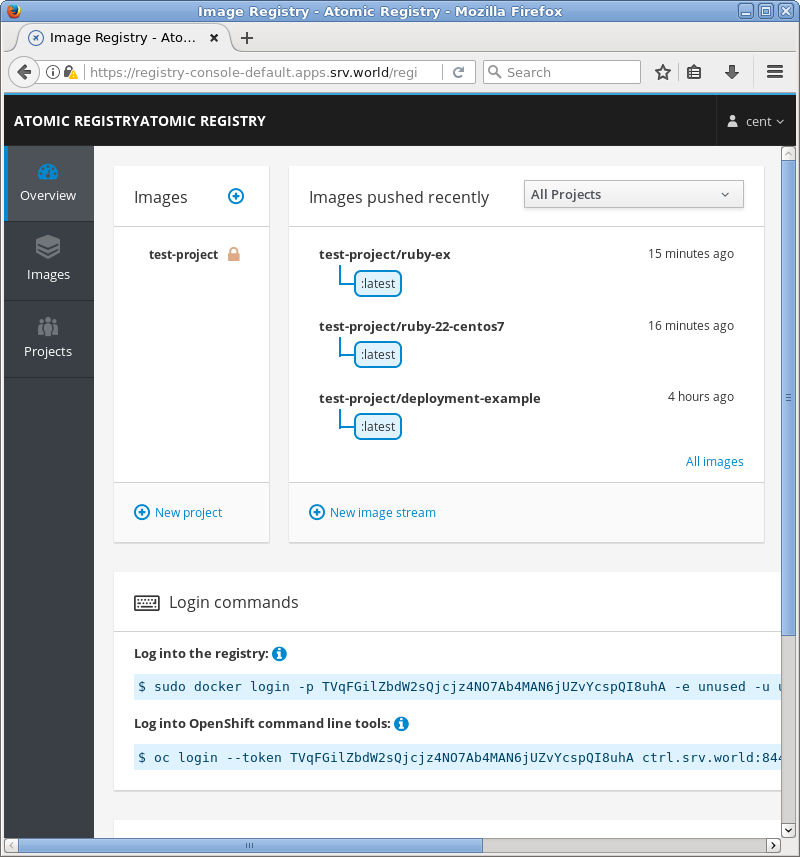
| [5] | Registry Console に割り当てられた URL (上記例の場合 [registry-console-default.apps.srv.world]) が名前解決可能な任意のホストから [https://registry-console-default.apps.srv.world/] へ Web アクセスし(認証時はリダイレクトされる)、任意のユーザーでログインすると Registry の状況が閲覧できます。 |
|
関連コンテンツ