Apache2 : PHP + PHP-FPM2023/07/04 |
|
Install PHP-FPM (FPM : FastCGI Process Manager) to make PHP scripts be fast.
|
|
| [1] | |
| [2] | Install PHP-FPM. |
|
root@www:~# apt -y install php-fpm
|
| [3] | Add Settings in Virtualhost you'd like to set PHP-FPM. |
|
root@www:~#
vi /etc/apache2/sites-available/default-ssl.conf # add into <VirtualHost> - </VirtualHost>
    <FilesMatch \.php$>
        SetHandler "proxy:unix:/var/run/php/php8.2-fpm.sock|fcgi://localhost/"
    </FilesMatch>
</VirtualHost>
root@www:~# a2enmod proxy_fcgi setenvif Considering dependency proxy for proxy_fcgi: Enabling module proxy. Enabling module proxy_fcgi. Module setenvif already enabled To activate the new configuration, you need to run: systemctl restart apache2root@www:~# a2enconf php8.2-fpm Enabling conf php8.1-fpm. To activate the new configuration, you need to run: systemctl reload apache2root@www:~# systemctl restart php8.2-fpm apache2
|
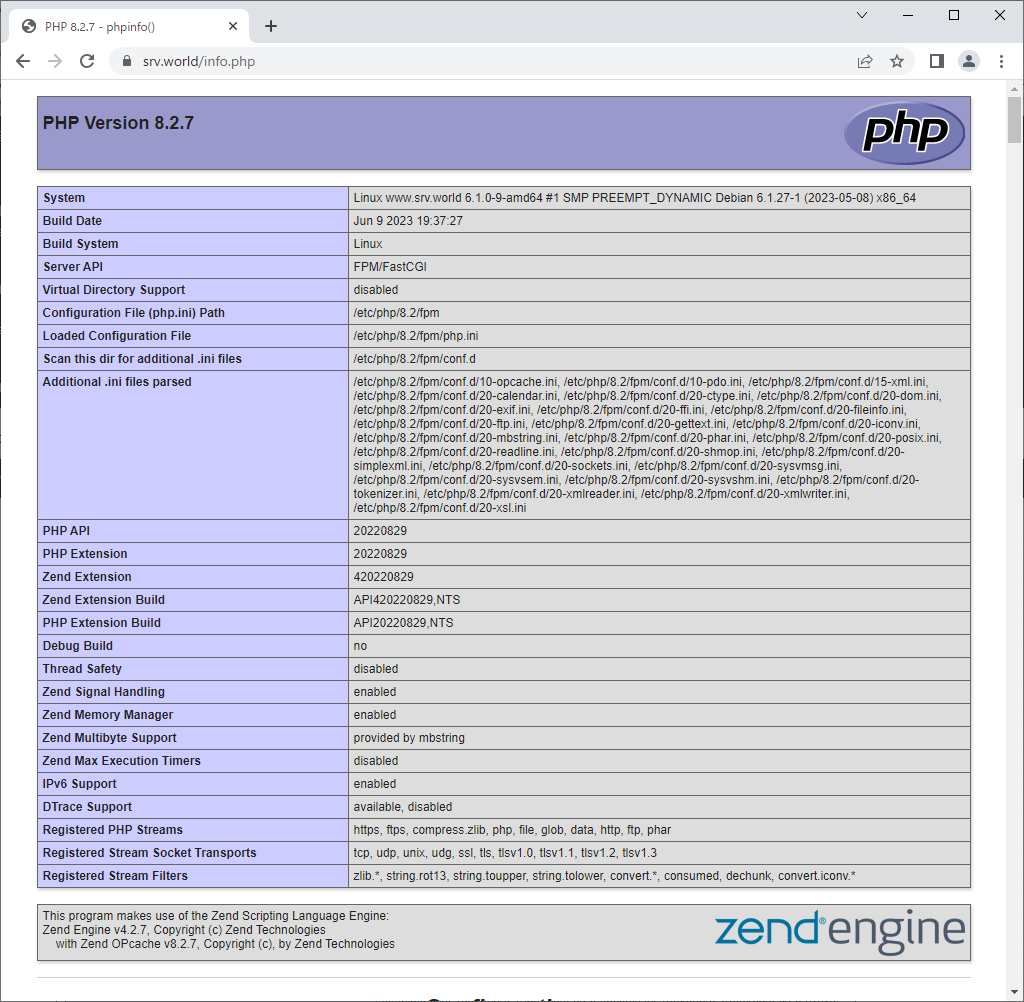
| [4] | Create [phpinfo] in Virtualhost's web-root you set PHP-FPM and access to it, then that's OK if [FPM/FastCGI] is displayed. |
|
root@www:~# echo '<?php phpinfo(); ?>' > /var/www/html/info.php |
|
Matched Content