OKD 4 : Deploy Applications2022/08/02 |
|
Deploy Applications on OKD 4 Cluster.
It needs to configure settings adding users, configuring image registry before it.
OKD 4 Cluster on this example is based on the environment like follows.
--------------+----------------+-----------------+--------------
              |10.0.0.25       |                 |10.0.0.24
+-------------+-------------+  |  +--------------+-------------+
|   [mgr.okd4.srv.world]    |  |  | [bootstrap.okd4.srv.world] |
|        Manager Node       |  |  |       Bootstrap Node       |
|           DNS             |  |  |                            |
|          Nginx            |  |  |                            |
+---------------------------+  |  +----------------------------+
                               |
--------------+----------------+-----------------+--------------
              |10.0.0.40       |                 |10.0.0.41
+-------------+-------------+  |  +--------------+-------------+
| [master-0.okd4.srv.world] |  |  |  [master-1.okd4.srv.world] |
|      Control Plane#1      |  |  |      Control Plane#2       |
|                           |  |  |                            |
|                           |  |  |                            |
+---------------------------+  |  +----------------------------+
                               |
--------------+----------------+
              |10.0.0.42
+-------------+-------------+
| [master-2.okd4.srv.world] |
|      Control Plane#3      |
|                           |
|                           |
+---------------------------+
|
| [1] | Login as an user on a client computer and Deploy an Application. |
|
# login [centos@client ~]$ oc login -u serverworld https://api.okd4.srv.world:6443
The server uses a certificate signed by an unknown authority.
You can bypass the certificate check, but any data you send to the server could be intercepted by others.
Use insecure connections? (y/n): y

Authentication required for https://api.okd4.srv.world:6443 (openshift)
Username: serverworld
Password:
Login successful.

You don't have any projects. You can try to create a new project, by running

    oc new-project <projectname>

Welcome! See 'oc help' to get started.
# create [test-project] project [centos@client ~]$ oc new-project test-project
Now using project "test-project" on server "https://api.okd4.srv.world:6443".

You can add applications to this project with the 'new-app' command. For example, try:

    oc new-app rails-postgresql-example

to build a new example application in Ruby. Or use kubectl to deploy a simple Kubernetes application:

    kubectl create deployment hello-node --image=k8s.gcr.io/e2e-test-images/agnhost:2.33 -- /agnhost serve-hostname
# deploy [rails-postgresql-example] application [centos@client ~]$ oc new-app rails-postgresql-example
--> Deploying template "openshift/rails-postgresql-example" to project test-project

     Rails + PostgreSQL (Ephemeral)
     ---------
     An example Rails application with a PostgreSQL database. For more information about using this template, including OpenShift considerations, see https://github.com/sclorg/rails-ex/blob/master/README.md.

     WARNING: Any data stored will be lost upon pod destruction. Only use this template for testing.

     The following service(s) have been created in your project: rails-postgresql-example, postgresql.

     For more information about using this template, including OpenShift considerations, see https://github.com/sclorg/rails-ex/blob/master/README.md.

     * With parameters:
        * Name=rails-postgresql-example
        * Namespace=openshift
        * Memory Limit=512Mi
        * Memory Limit (PostgreSQL)=512Mi
        * Git Repository URL=https://github.com/sclorg/rails-ex.git
        * Git Reference=
        * Context Directory=
        * Application Hostname=
        * GitHub Webhook Secret=52g0Jsu7N85aMsKSleKShHrAjRPLt65OMIKDtSC0 # generated
        * Secret Key=kt28vcf8fj5a2c0248w3fyas4jqnbv8sjvstpiq0nmfavoc2j33yo2fy5cvv5dn2cvfkbneygj2tf55onrfg6g1ruf0synxu6m5hbru3lcfhftcpafdb38tkmj102jl # generated
        * Application Username=openshift
        * Application Password=secret
        * Rails Environment=production
        * Database Service Name=postgresql
        * Database Username=userT5G # generated
        * Database Password=S8yjmUfm # generated
        * Database Name=root
        * Maximum Database Connections=100
        * Shared Buffer Amount=12MB
        * Custom RubyGems Mirror URL=

--> Creating resources ...
    secret "rails-postgresql-example" created
    service "rails-postgresql-example" created
    route.route.openshift.io "rails-postgresql-example" created
    imagestream.image.openshift.io "rails-postgresql-example" created
    buildconfig.build.openshift.io "rails-postgresql-example" created
    deploymentconfig.apps.openshift.io "rails-postgresql-example" created
    service "postgresql" created
    deploymentconfig.apps.openshift.io "postgresql" created
--> Success
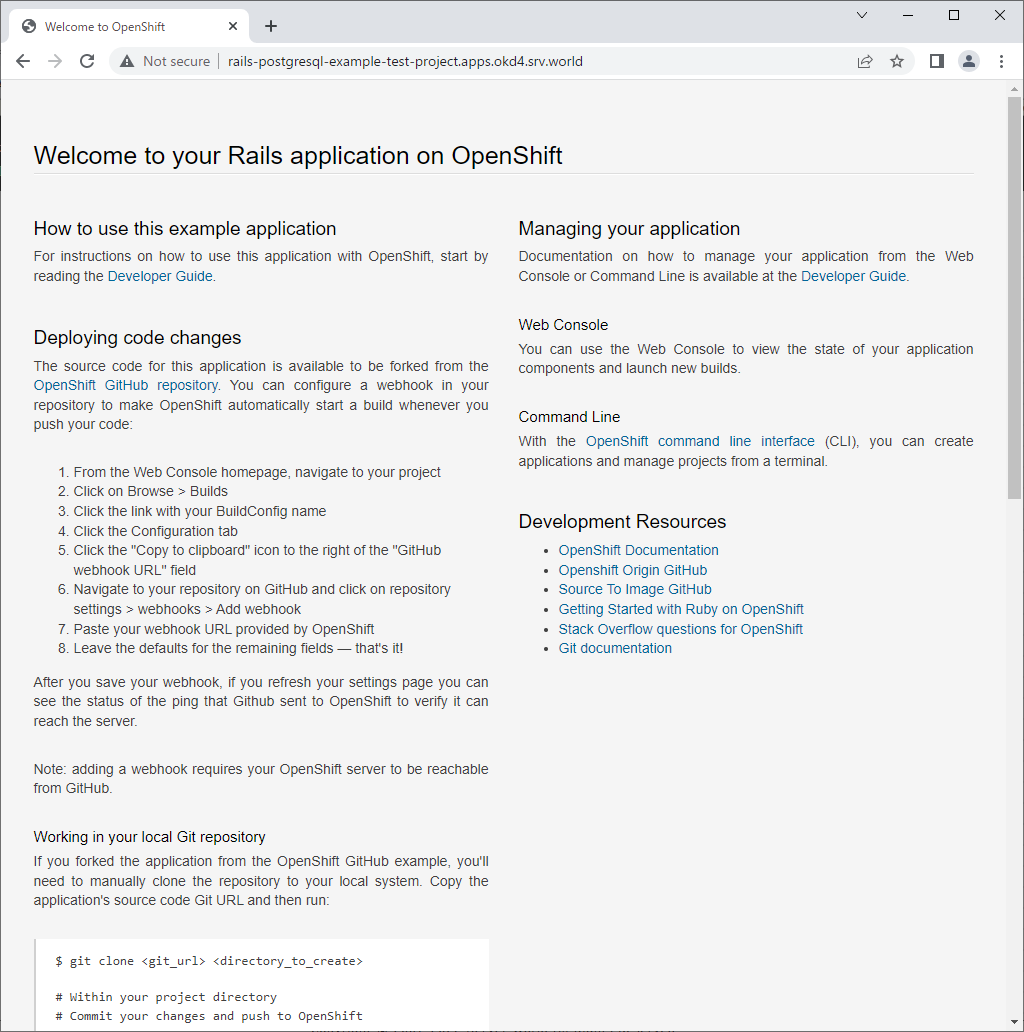
    Access your application via route 'rails-postgresql-example-test-project.apps.okd4.srv.world'
    Build scheduled, use 'oc logs -f buildconfig/rails-postgresql-example' to track its progress.
    Run 'oc status' to view your app.
# show status [centos@client ~]$ oc status
In project test-project on server https://api.okd4.srv.world:6443

svc/postgresql - 172.30.77.164:5432
  dc/postgresql deploys openshift/postgresql:12-el8
    deployment #1 deployed about a minute ago - 1 pod

http://rails-postgresql-example-test-project.apps.okd4.srv.world (svc/rails-postgresql-example)
  dc/rails-postgresql-example deploys istag/rails-postgresql-example:latest <-
    bc/rails-postgresql-example source builds https://github.com/sclorg/rails-ex.git on openshift/ruby:2.7-ubi8
      build #1 running for about a minute - f518b26: Restrict version of the pg gem to remain compatible with RHEL 7. (Jarek Prokop)
    deployment #1 waiting on image or update

View details with 'oc describe <resource>/<name>' or list resources with 'oc get all'.
[centos@client ~]$ oc get pods NAME READY STATUS RESTARTS AGE postgresql-1-9tjjj 1/1 Running 0 8m22s postgresql-1-deploy 0/1 Completed 0 8m42s rails-postgresql-example-1-build 0/1 Completed 0 8m43s rails-postgresql-example-1-deploy 0/1 Completed 0 53s rails-postgresql-example-1-hook-pre 0/1 Completed 0 49s rails-postgresql-example-1-p7zp9 1/1 Running 0 28s[centos@client ~]$ oc describe svc/rails-postgresql-example
Name:              rails-postgresql-example
Namespace:         test-project
Labels:            app=rails-postgresql-example
                   template=rails-postgresql-example
Annotations:       description: Exposes and load balances the application pods
                   openshift.io/generated-by: OpenShiftNewApp
                   service.alpha.openshift.io/dependencies: [{"name": "postgresql", "kind": "Service"}]
Selector:          name=rails-postgresql-example
Type:              ClusterIP
IP Family Policy:  SingleStack
IP Families:       IPv4
IP:                172.30.128.125
IPs:               172.30.128.125
Port:              web  8080/TCP
TargetPort:        8080/TCP
Endpoints:         10.130.0.17:8080
Session Affinity:  None
Events:            <none>
# confirm access path [centos@client ~]$ oc get routes NAME HOST/PORT PATH SERVICES PORT TERMINATION WILDCARD rails-postgresql-example rails-postgresql-example-test-project.apps.okd4.srv.world rails-postgresql-example >all< None # to delete application, run like follows [centos@client ~]$ oc delete all -l app=rails-postgresql-example |
| That's OK if follolwing screen is shown to access to the access path URL. |
|
Matched Content